Hello,
I have a document that contains several text placeholders, each using different styles. At runtime, I need to replace these placeholders with HTML content, such as bulleted lists. While the styling of the inserted list items correctly matches the placeholder text, the bullet symbols themselves always use a different style that relies on the SymbolMT font. I want the bullets to inherit the same styling as the placeholder text and avoid using SymbolMT. The only solution I’ve found so far is to iterate over the newly created paragraphs and replace their ListFormat.ListLevelFormat.CharacterFormat with the formatting from the paragraph itself, then explicitly set the bullet symbol via ListFormat.ListLevelFormat.NumberFormat. Here’s a simplified snippet of the code I’m using:
var replacedRange = document
     .Content.Find("html")
     .FirstOrDefault()
     .LoadText(
         "<ul><li>Coffee</li><li>Tea</li><li>Milk</li></ul>",
         new HtmlLoadOptions()
         {
             InheritCharacterFormat = true,
             InheritParagraphFormat = true
         }
     );

 var htmlRange = new ContentRange(
     replacedRange.Start.Parent.Parent.Content.Start,
     replacedRange.End.Parent.Parent.Content.End
 );

 foreach (
     Paragraph paragraph in htmlRange.GetChildElements(
         [GemBox.Document.ElementType.Paragraph]
     )
 )
 {
     var listFormat = paragraph.ListFormat.ListLevelFormat;
     if (paragraph.ListFormat.IsList && listFormat.NumberStyle == NumberStyle.Bullet)
     {
         listFormat.CharacterFormat =
             startParagraph.ParagraphFormat.Style.CharacterFormat.Clone();
         listFormat.NumberFormat = "•";
     }
 }
Now, when I insert a bulleted list using Word anywhere in the (up-)loaded document, the bullets automatically adopt the styling of the list items, even though I haven’t modified the list style of the DefaultParagraphFormat.
This is the resulting PDF (the second list was inserted via Word):
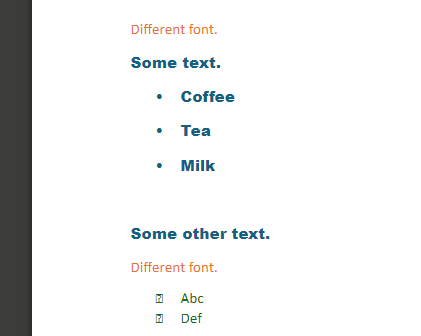
How can I prevent this behavior?
Also, is there an alternative way to avoid using the SymbolMT font for bullets without manually replacing the displayed bullet symbol each time?
Thank you very much in advance.