Hi there. These could be a bug or a feature request, I’m unsure so posting it here anyways.
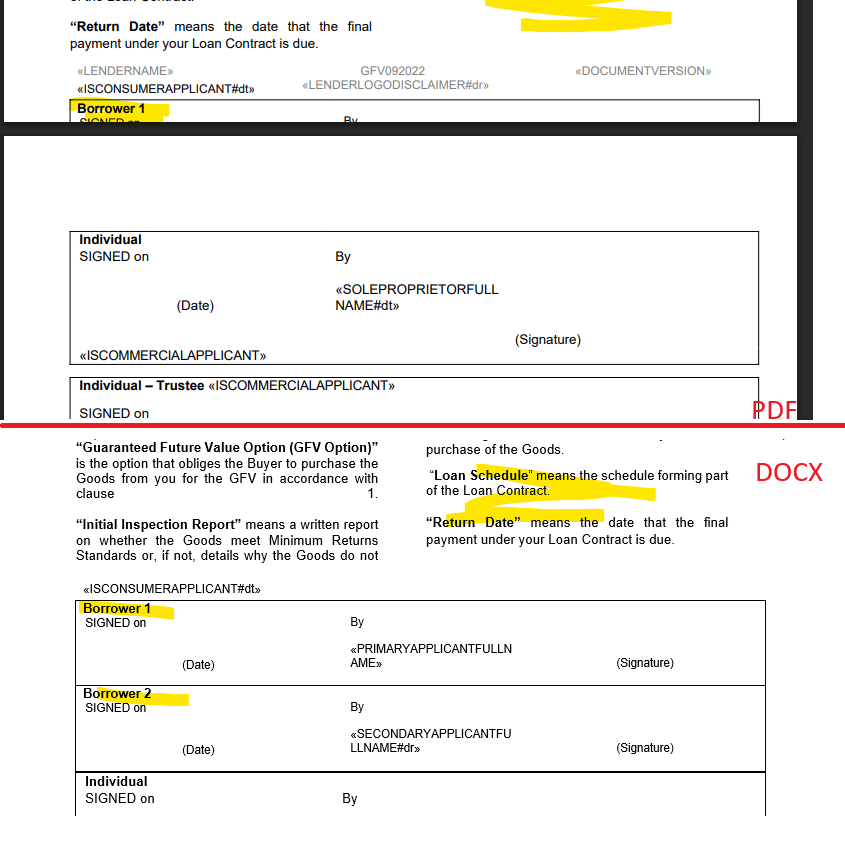
I included a screenshot in the zip file at the bottom, which demonstrates the issues.
1) Wrap-around on a two-column format
When using a two-column format, tables single-cell tables break apart.
2) Indented headings
When using indentation with a heading, the indentation doesn’t seem to be translated across properly.
3) Table squishes itself upon itself
Half the table folds back up upon itself.
Example output files and screenshot https://drive.google.com/file/d/1gRvGU1nNg8xOAVDDzz1wjmREDvCWAOpE/view?usp=drive_link
Re the screenshot: the lefthand-side of screenshot is the DOCX and righthand-side is the GemBox pdf output.
Any help would be great, thanks.
Hey @mario.gembox were you able to reproduce? Cheers
Hi James,
Yes, one of our developers is currently working on it.
Regards,
1 Like
Hi James,
Please try again with this NuGet package:
Install-Package GemBox.Document -Version 2025.10.112
Also, please try removing the floating layout from the Table element that’s inside the Section with multiple text columns:
Does this solve your issue?
Regards,
1 Like
Thanks for the prompt fix!
It resolved issues #1 and #2 which is great thanks! But the table is still squished together..
I noticed Aspose (and other pdf libs) don’t have this issue, and there’s no visible issue on the DOCX I would expect it to render the same on the PDF - any chance of a fix for that one too please?
I cannot control what people put into the DOCX file unfortunately
Hi @mario.gembox any updates on the above? Thanks
Once this issue is fixed we’ll look to start the licensing process, thanks.
Hi James,
Please try again with this NuGet package:
Install-Package GemBox.Document -Version 2025.10.117
Does this solve your issue?
Regards,
James_H
October 20, 2025, 7:50pm
11
Thanks! It fixes that specific table squishing issue, but I found another similar one here:
Notice the content doesn’t wrap around to the second column, and the top of the table is cut off at the page break.
Example DOCX and PDF outputs: https://drive.google.com/file/d/1ZX-9xUq5wyf80j2T9L-xX3_eBNOgTCIP/view?usp=drive_link
Hi James,
Unfortunately, we cannot use the DOCX file you sent us.
Regards,
James_H
October 27, 2025, 7:35pm
13
Sorry for that @mario.gembox, try the link again, I’ve re-uploaded with an unlocked docx, thanks.
Hi James,
Please try again with this NuGet package:
Install-Package GemBox.Document -Version 2025.10.127
Does this solve your issue?
Regards,
James_H
November 2, 2025, 9:20pm
15
Fix confirmed, thanks very much