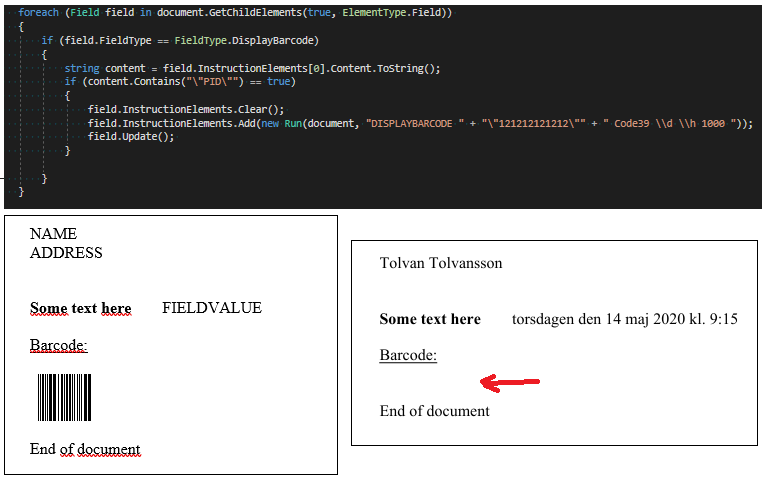
A beginner to GemBox currently evaluating it to see if it works for our needs. Our customers create Word-files as templates. We then loop through fields and replace values based on their bookmark-names, save it as a new document and send it to a printer (or convert to pdf depending on the situation).
This work well but then there is a little situation regarding a special barcode-field defined in the template as “DISPLAYBARCODE “PID” Code39 \d \h 1000”. We want to replace the value PID with something else programmatically to be displayed as a Code39-barcode. If I understand this correct I can’t really replace but instead need to clear and add new. Searching online I’ve been suggested the following:
(Note: due to being a new user Im not allowed to add more than 1 media in the post so I have ve fitted 3 images into 1)
The field is found and all code is executed but the resulting printout is that the barcode is no longer visible. I can’t figure out why and help would be greatly appreciated.
The Word-template is the picture on the bottom left. The result when modified and printed is on the bottom right.
Also, I wanted to add that looking for the "PID" value in only the first Field.InstructionElements collection might not work for all the documents. Instead you should use Field.GetInstructionText().
Also, the Field.Update() call is not needed when saving to PDF, XPS, or image format and when printing.
So, here is a new snippet you can try out:
if (field.FieldType == FieldType.DisplayBarcode)
{
    string content = field.GetInstructionText();
    if (content.Contains("\"PID\""))
    {
        string newPidValue = "\"121212121212\"";
        var newInstruction = new Run(document, $"{newPidValue} Code39 \\d \\h 1000 ");

        field.InstructionElements.Clear();
        field.InstructionElements.Add(newInstruction);
    }
}