We are using ContentRange.ToString() to get the plain text found. In certain scenarios the text may be styled with AllCaps or SmallCaps, in these cases the string returned is all uppercase instead of whatever the text was without that effect applied. How can we get the string from a ContentRange without AllCaps or SmallCaps applied?
Hi,
Note that Run.Text doesn’t apply this formatting, so perhaps you could use something like this:
ContentRange range = ...

var contentBuilder = new StringBuilder();
foreach (var element in range.GetChildElements())
{
    string text = element switch
    {
        Paragraph paragraph when contentBuilder.Length > 0 => Environment.NewLine,
        Run run => run.Text,
        SpecialCharacter specialCharacter => specialCharacter.Content.ToString(),
        _ => string.Empty
    };
    contentBuilder.Append(text);
}

Console.WriteLine(contentBuilder.ToString());
Does this work for you?
Regards,
Mario
Hi Mario,
This is certainly a good start. I am finding that sometimes the ContentRange does not have any child elements – specifically when it is in the middle of a line. Is that expected?
Are there any settings for TxtSaveOptions that would change how ContentRange.ToString() would behave?
Thanks,
Brian
Hi Brian,
That’s not expected.
Can you please send us a small Visual Studio project that reproduces your issue so we can investigate it?
Regards,
Mario
Here is code to demonstrate the issue:
// using NuGet package: GemBox.Document 2026.8.113

ComponentInfo.SetLicense("FREE-LIMITED-KEY");

var documentModel = DocumentModel.Load(@"C:\GemboxTest.docx", GemBox.Document.LoadOptions.DocxDefault);
var range = documentModel.Content.Find(new Regex("\\[.+\\]")).First();
if (range.GetChildElements().Count() == 0)
{
	Console.WriteLine("no child elements");
}
Console.WriteLine($"Text found: '{range}'");
Console.WriteLine($"Parent text: '{((Run)range.Start.Parent).Text}'");
I don’t see how I can upload a Word document, but here is a screenshot of what I put in it:
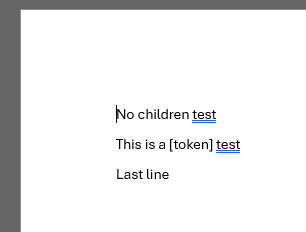
I just opened a blank Word doc and put the following text in it:
No children test
This is a [token] test
Last line
The output I got was:
no child elements
Text found: '[token]'
Parent text: 'This is a [token] test'
Out of curiosity I wondered what would happen if the style changed in the middle of the ContentRange. So I updated the Word doc so that just the “ok” in the middle of the word was a different color. Example:
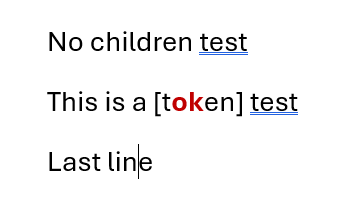
Test code:
ComponentInfo.SetLicense("FREE-LIMITED-KEY");

var documentModel = DocumentModel.Load(@"C:\GemboxTest.docx", GemBox.Document.LoadOptions.DocxDefault);
var range = documentModel.Content.Find(new Regex("\\[.+\\]")).First();
Console.WriteLine($"Text found: '{range}'");

if (range.GetChildElements().Count() == 0)
{
	Console.WriteLine("no child elements");
}
else
{
	foreach (var el in range.GetChildElements().OfType<Run>())
	{
		Console.WriteLine($"Child elements: '{el.Text}'");
	}
}

Console.WriteLine($"Start.Parent text: '{((Run)range.Start.Parent).Text}'");
Console.WriteLine($"End.Parent text: '{((Run)range.End.Parent).Text}'");
Output:
Text found: '[token]'
Child elements: 'ok'
Child elements: 'en] test'
Start.Parent text: 'This is a [t'
End.Parent text: 'en] test'
Hi Brian,
The iteration was skipping the first Run element in the ContentRange.
Can you please try again with this NuGet package:
Install-Package GemBox.Document -Version 2026.9.136
Note that this is a hidden (unlisted) version. To install it, you’ll need to run the above command in the NuGet Package Manager Console (Tools → NuGet Package Manager → Package Manager Console).
However, based on your exact context, I’m afraid the provided solution won’t work because your placeholder text occupies part of the Run element (or elements).
Instead, how about you try using the following together with the provided version:
var documentModel = DocumentModel.Load("input.docx");
var range = documentModel.Content.Find(new Regex("\\[.+\\]")).First();

var originalCapsFormattings = new List<(Run Run, bool AllCaps, bool SmallCaps)>();

foreach (Run run in range.GetChildElements(ElementType.Run))
{
    originalCapsFormattings.Add((run, run.CharacterFormat.AllCaps, run.CharacterFormat.SmallCaps));
    run.CharacterFormat.AllCaps = false;
    run.CharacterFormat.SmallCaps = false;
}

Console.WriteLine(range.ToString());

foreach (var item in originalCapsFormattings)
{
    item.Run.CharacterFormat.AllCaps = item.AllCaps;
    item.Run.CharacterFormat.SmallCaps = item.SmallCaps;
}
Does this work for you?
Regards,
Mario
Mario,
So you are suggesting to “unset” the character formatting that would affect the case? I can make that work. I think I will have to also unset the character formatting for the range.Start.Parent since the child elements don’t always include the first run of the range.
Thanks,
-Brian
Yes.
No need for that.
Please use the latest version I sent you, it will include the first Run element.
Regards,
Mario
Ok, so it was a bug that the children sometimes didn’t include the first Run – and not expected behavior? To be clear, I think this has been the behavior for years.
Yes, that was the case and it was not the intended behavior.