Hi there,
I’ve got what appears to be a regression with importing lists from HTML. Following our discussion in Lists imported from HTML use multiple numbering styles, there was an update which ensured that lists using the default document style and lists imported from HTML were styled identically. Unfortunately, it seems that in later versions this behavior is no longer preserved, and lists imported from HTML are indented further (1/3 inch) than lists constructed manually (1/4 inch).
using GemBox.Document;

var document = new DocumentModel();

var section = new Section(document);
document.Sections.Add(section);

var blocks = section.Blocks;

// Create bullet list style.
ListStyle bulletList = new ListStyle(ListTemplateType.Bullet);

// Create bullet list items.
blocks.Add(new Paragraph(document, "First item.")
{
    ListFormat = { Style = bulletList }
});
blocks.Add(new Paragraph(document, "Second item.")
{
    ListFormat = { Style = bulletList }
});
blocks.Add(new Paragraph(document, "Third item.")
{
    ListFormat = { Style = bulletList }
});

blocks.Add(new Paragraph(document));

var loadOptions = new HtmlLoadOptions
{
    InheritCharacterFormat = true,
    InheritParagraphFormat = true,
};

section.Content.End.LoadText("""
    <ul>
        <li><p>Item 1</p></li>
        <li><p>Item 2</p></li>
        <li><p>Item 3</p></li>
    </ul>
""", loadOptions);

document.Save("document.docx");
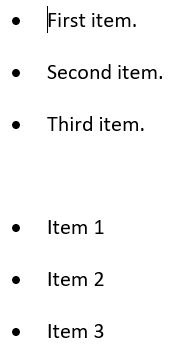
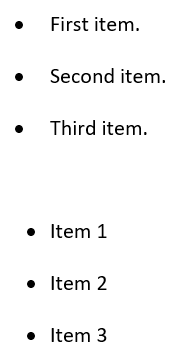
I’m also able to reproduce this issue in the latest version (2026.1.100), but version 2025.12.118 is the first one where I noticed this issue occurring. I would greatly appreciate your assistance getting this issue resolved.
Best,
Michael